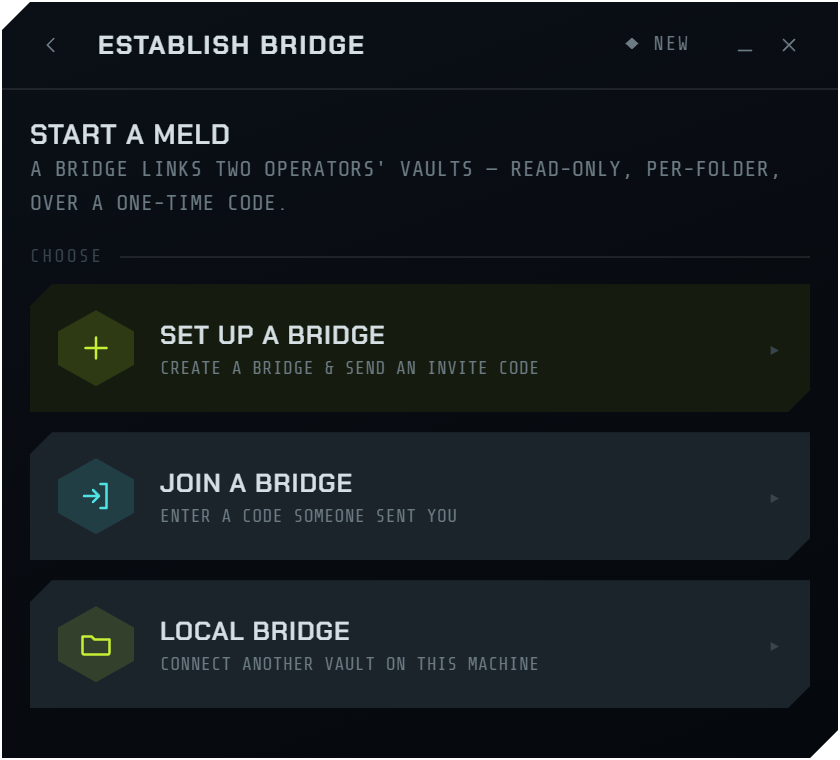
Connect your two vaults

Encrypted P2P connection for second-brain builds.

A direct, end-to-end-encrypted link between two second-brain vaults. Your AI reads what the other operator shares — read-only, per-folder, every access logged on both sides.

iroh QUIC transport layer · built in Rust · E2EE
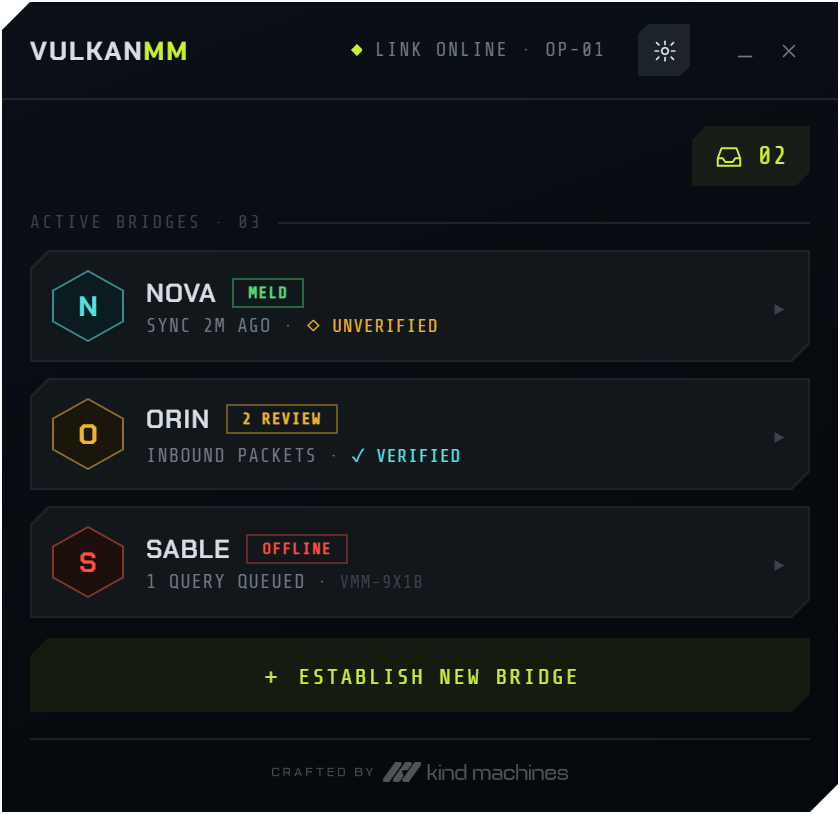
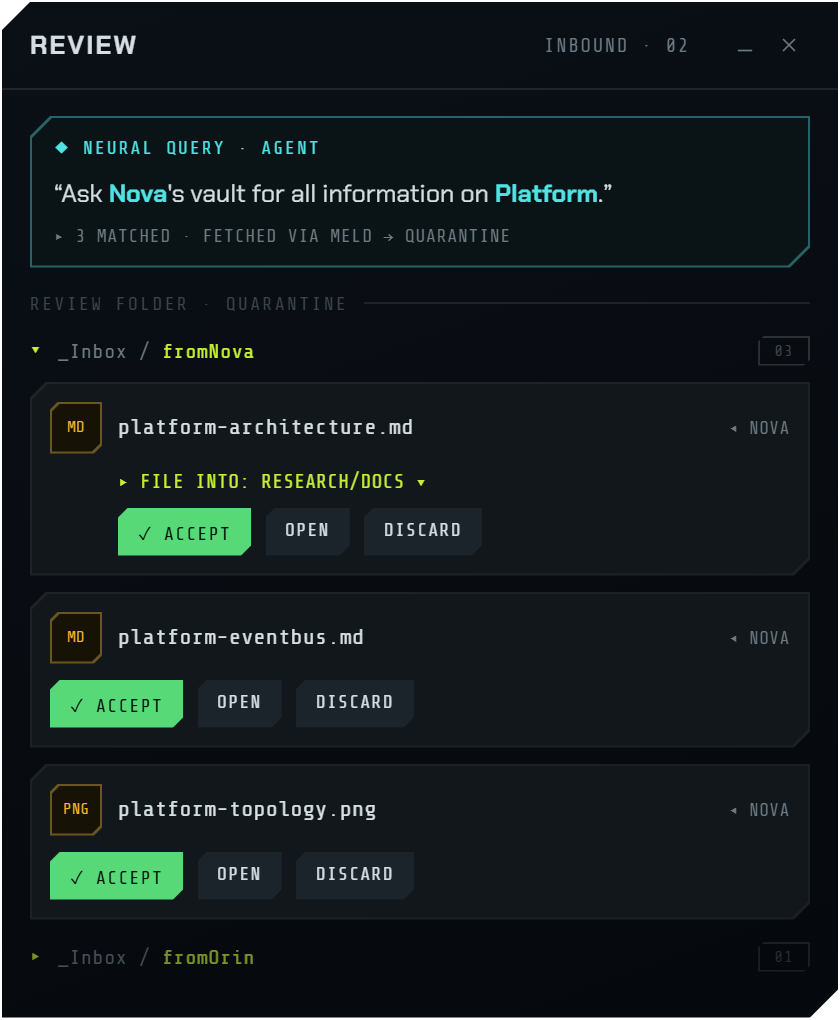
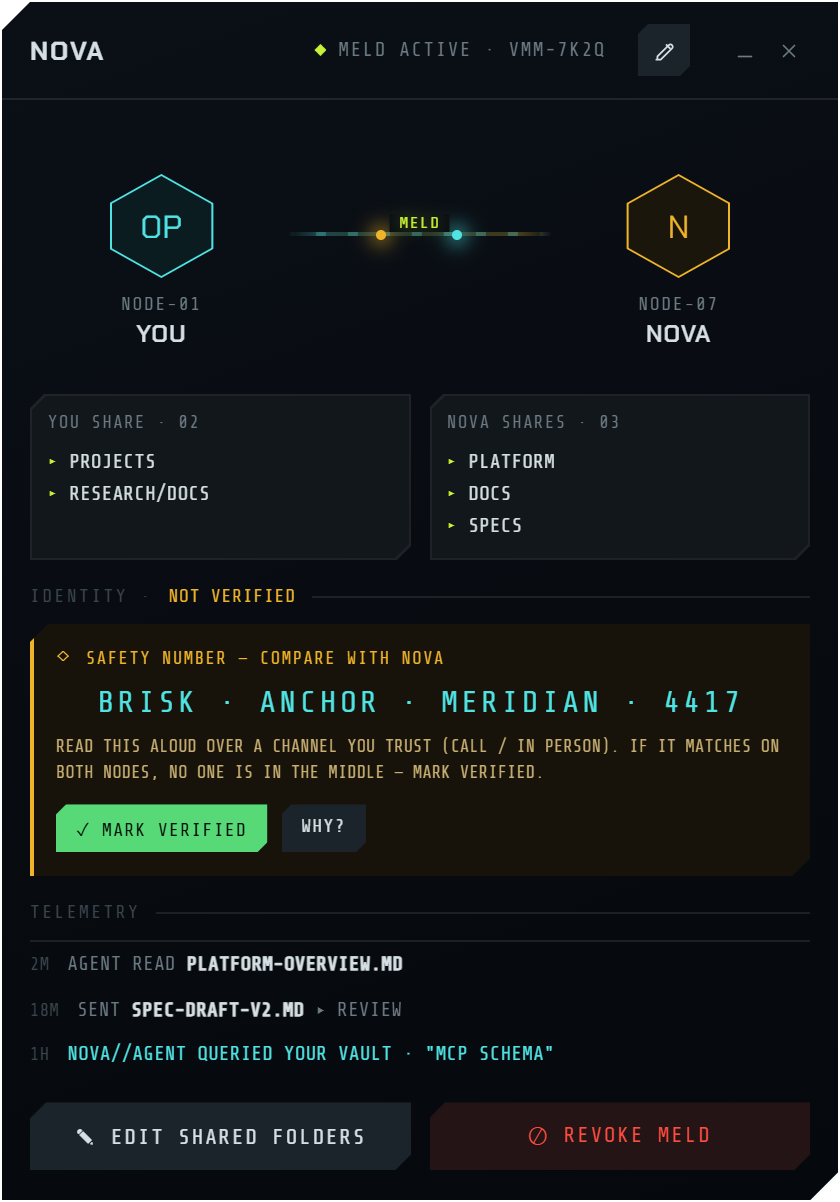
VulkanMM active bridges VulkanMM review quarantine VulkanMM meld detail — verification + telemetry
Security by construction

No servers. No accounts.
No way to write to your vault.

The link is a direct encrypted tunnel between two nodes. There is no cloud in the middle holding your notes, and no protocol operation that can modify a peer's vault — the surface is read-and-pull only.

Transport

Direct P2P over iroh

QUIC with hole-punching connects the two nodes directly — no server sits between your vaults. A public relay only brokers the handshake; bring your own if you'd rather not touch the mesh.

Active bridges
Verification

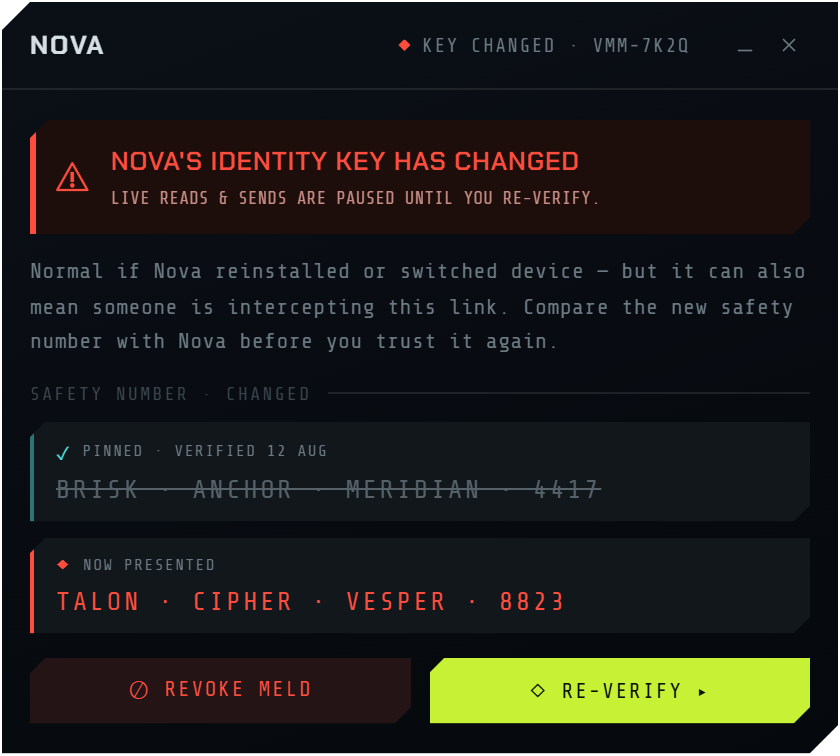
Catch a changed key

TOFU-pinned identities, confirmed out-of-band with a safety number. If a peer's key changes — reinstall, new device, or a man-in-the-middle — reads pause until you re-verify.

Key-changed alert
Encryption

End-to-end encrypted

Every byte rides a QUIC / TLS 1.3 stream keyed to your Ed25519 identity — the key that is your node's address.

Foundation

Written in Rust

Memory-safe and small. Folder scope is enforced on the serving side — an out-of-scope path is refused over the wire, not filtered after.

Transparency

Logged on both sides

Every search and read is visible to both operators, live. Trust isn't a promise — it's a mutual audit trail you watch as it happens.

02m
AGENT READ platform-overview.md
18m
SENT spec-draft-v2.md ▸ review
01h
NOVA//AGENT QUERIED YOUR VAULT · "mcp schema"
Runs on your machine

Your AI reads peers over a local socket.

Nothing is stored in a cloud. The app hosts a Model Context Protocol server on localhost — your assistant queries a peer's shared vault through it, over the same encrypted link.

  • Local MCP surface. A JSON-RPC server bound to 127.0.0.1:7333. Point Claude, or any MCP client, at it — it's briefed on connect.
  • No cloud storage. Your notes never leave your machine except over the direct, end-to-end-encrypted peer link. There is no VulkanMM server to breach.
  • Enforced remotely. Reads run against the peer's live vault, where their scope and approval policy apply — the tools can't reach anything unshared.
MCP socket · bound :7333 ● live
# your assistant, on your behalf
bridge_list
bridge_search { bridge, query }
bridge_read   { bridge, path }
bridge_fetch { bridge, paths[] } → quarantine
# read-only · scope enforced peer-side
Total control

You decide what's shared, what lands, and when it ends.

Access is scoped per bridge and reversible at any moment. Inbound content is never trusted by default — it waits in quarantine until you say so.

01
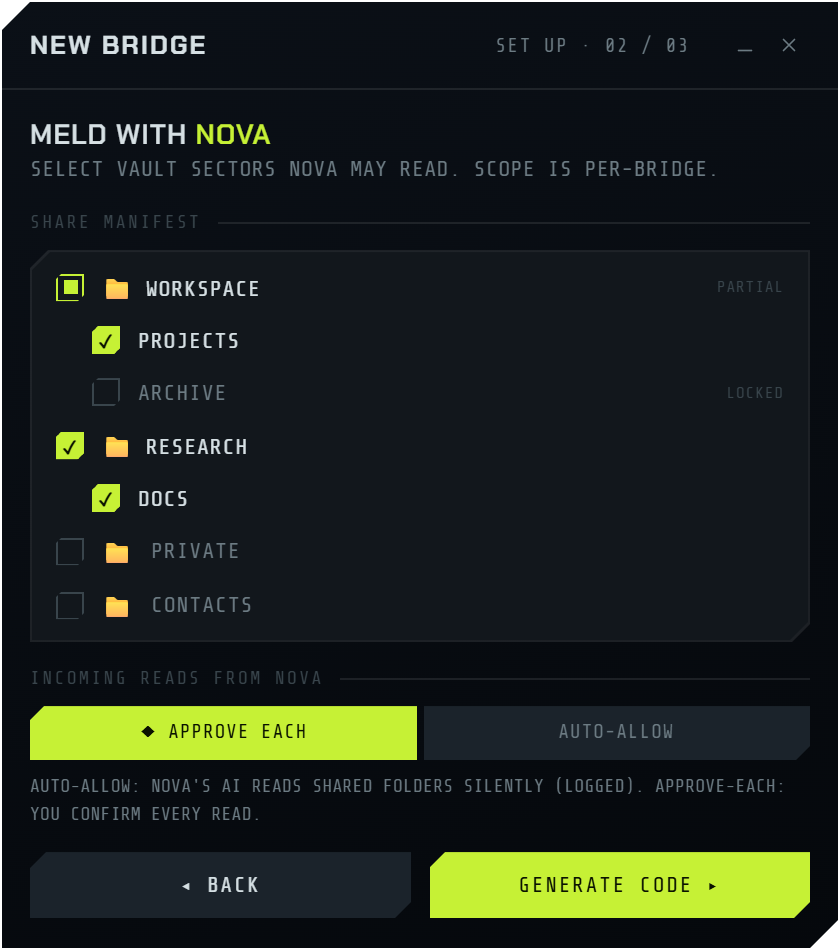
Share manifest — granular per-folder scope
Share manifest

Grant access one sector at a time

  • Per-folder scope. Pick exactly which vault sectors a peer may read — nested and granular, down to a single subfolder.
  • Different for every bridge. Each peer gets its own manifest. Scope is per-peer, never global.
  • Approve each read, or auto-allow. Confirm every access, or trust a bridge to read silently — always logged.
02
Quarantine review folder with provenance
Quarantine & revoke

Nothing enters your vault unasked

  • Per-sender quarantine. Pulled files drop into a review folder tagged by who sent them, with full provenance.
  • Review, then file or discard. You accept what belongs and bin the rest. The vault only changes on your action.
  • Revoke any time. End a meld and access stops immediately — the link, the scope, and the pinned key are gone.
How a meld is made

Three steps. No sign-up in sight.

01
Invite

Send an invite

Pick the sectors to share and generate a compact invite carrying your node id and a bridge token. Send it over any channel you trust.

02
Verify

Compare safety numbers

The joiner pastes the invite; both sides see the same safety number from both keys. Read it aloud, confirm no one's in the middle, mark verified.

03
Meld

Read, on your terms

Your AI queries the shared sectors over the live link. Files you pull land in quarantine; every access shows on both operators' telemetry.

Questions

How it works in practice.

What happens if the other person is offline?
Requests don't fail — they queue. If you ask your assistant to pull from a peer, or send them a file, while they're offline, the operation is saved and retried automatically the moment they're reachable again. VulkanMM checks for the peer in the background and delivers the queued read or send as soon as the link is live — so an offline peer just means later, not error. You'll get a notification when a queued item goes through.
What AI assistants can I connect?
Any Model Context Protocol client. VulkanMM hosts a local MCP server on 127.0.0.1:7333; you point your assistant at the small vulkanmm-mcp connector and it's briefed automatically on connect. Claude (Desktop or Code) works out of the box, and any MCP-compatible client can drive the same read-only tools — nothing is specific to one vendor.
How do I request files or send them?
You just prompt your assistant in plain language — "ask Nova's vault for everything on the platform architecture." Under the hood it searches the peer's shared sectors and pulls the matches into your quarantine folder for review. Sending works the same way: hand a file to a peer and it lands in their review folder, never straight in their vault. There's no separate UI to learn — your AI is the interface, and VulkanMM enforces the rules underneath it.
Can I use my own iroh relay?
Yes. By default VulkanMM uses the public iroh relay mesh for NAT traversal, but you can bring your own — paste a relay URL (for example one you've purchased from iroh) in Preferences → Relay. Leave it blank to stay on the public mesh. The change takes effect on the next launch, and discovery still resolves your address either way.
[  Get VulkanMM  ]

Install it. Meld your first vault.

A signed desktop app that runs quietly in your tray and keeps your melds live in the background. It updates itself.

Windows

Windows 10 / 11 · signed installer (.exe)

Download for Windows
macOS

Apple Silicon + Intel · universal (.dmg)

Download for macOS
Always the latest signed build. Trouble downloading? See all releases →